
TL;DR
An AI agent or automation can report success while the record was never written, the answer came back empty or the trigger stopped firing days ago. The status only says the steps ended. To hear about these failures before a client does, check the business outcome in code after every run, compare each day’s volume with what should have happened, and make every trigger send a heartbeat. Then test those checks with deliberate failures, so a quiet failure becomes an alert that a named person acts on.
In this article
8 min read
In n8n, the error workflow only runs when an automatic execution fails (Error Trigger node documentation, checked 9 October 2026). A run whose AI step returns nothing usable, whose search finds no items, or whose trigger never fires has not failed, so it never reaches that alert. You notice those runs by checking what the run was for rather than whether it ended: an outcome check after each run, an expected-volume check over a day or a week, and a heartbeat that has to arrive on schedule. Each covers a gap the others leave, and each can break, so each needs its own test.
The question is asked in nearly these words. In June 2026 an n8n user asked on the n8n community forum how others detect production failures, or whether they first hear about them from a client; in a follow-up the same day they described AI agent steps set to continue on error, so the run ends green while the result is empty, malformed or invented. In August 2026 a builder asked on the Make community forum about runs that report success although the write they exist for never happened. A September 2026 thread on the r/n8n subreddit asked the same about stalled triggers and runs that process zero items.
Three failures a success status cannot show
In n8n a node set to “Continue” on error proceeds to the next node using the last valid data, and “Always Output Data” makes a node return an empty item even when it produced nothing (node settings, checked 9 October 2026). Both keep a workflow running through a bad item. Both also mean a step can fail without the run failing.
Silent failures come in three shapes, and each needs a different check:
- Wrong or empty result. The run completes, but the output is missing, malformed, or well formed and wrong: an agent reply without the fields the next step needs, a record written with a blank amount.
- Nothing to process. The run completes on zero items, often because something upstream changed. A renamed field makes a filter match nothing, and nothing downstream runs.
- No run at all. A schedule is switched off, a webhook stops receiving calls, the host restarts and a job never resumes. No execution is recorded, so nothing can turn red.
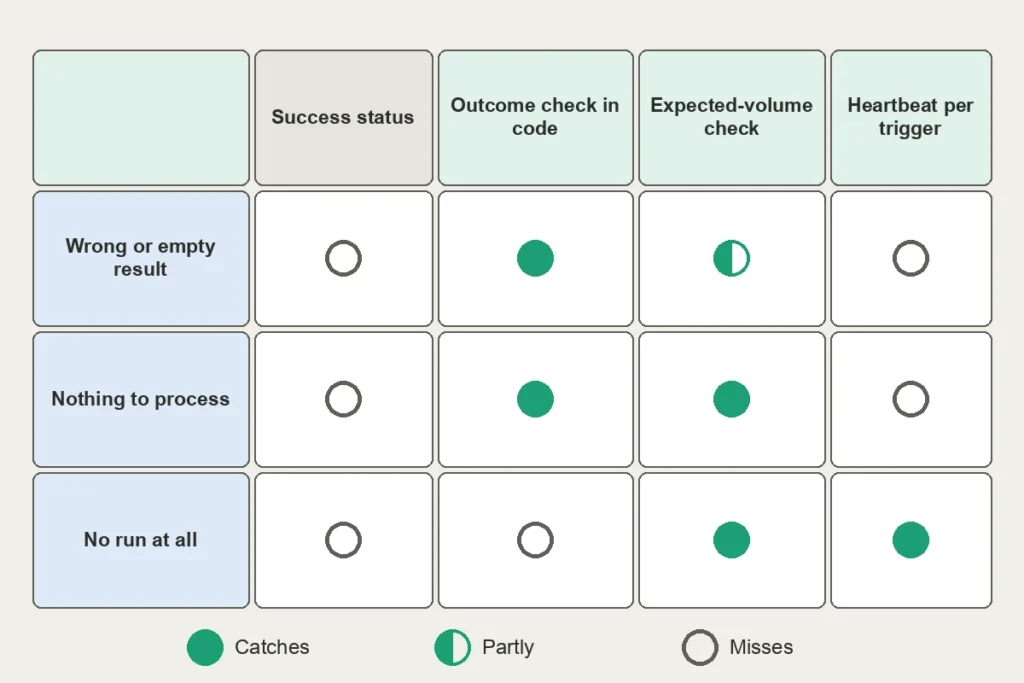
Check the outcome in code at the end of every run
Start by writing down, per workflow, what a successful run leaves behind: a CRM record with an owner, a sent message, a row with a non-empty amount, a reply that contains a booking reference. If nobody wrote the success criteria down, no check can be written.
Then add a final step that reads the result back from the system it went to, rather than trusting the response of the step that wrote it, and tests the fields that carry the business result: present, not empty, the right type, inside an allowed range, pointing at a record that exists. Keep this step in ordinary code, independent of the model it checks.
When the check fails, make the run fail. n8n’s Stop And Error node forces an execution to fail and triggers the error workflow (error handling documentation, checked 9 October 2026), so a silent failure travels the same alert route as a crash.
These checks catch missing and malformed results. They do not catch a well-formed wrong one: an agent that reads a plausible but incorrect amount from an invoice passes every field check. That needs a comparison with a source of truth where one exists, or a sampled human review. A passing check only proves what it was written to test, which is why a green test run cannot prove the product promise.
Compare each day with what should have happened
A per-run check cannot see a run that processed zero items when it normally processes forty, or a day with three runs instead of three hundred. For that, count the outcomes, such as records created and messages sent, per hour or per day, and compare the count with an expectation. A floor works for steady flows, such as at least one order an hour on weekdays between nine and five; for seasonal ones, compare with the same weekday in previous weeks.
Count in the destination, not in the execution history. Three hundred green executions that wrote nothing still count as three hundred.
Make absence itself a condition. A metric that stops arriving looks like a quiet day unless something asks for it. Prometheus provides an absent() function for exactly this: its documentation describes it as useful for alerting when no time series exist for a given metric and label (query functions, checked 9 October 2026). On any stack, alert when the newest record in the destination is older than it should be.
Make every trigger prove it ran
A heartbeat catches the run that never happened. At the end of each successful run, after the outcome check, the workflow sends a ping to a monitor. The monitor expects a ping every period and sends an alert when one is late by more than a grace time (Healthchecks.io documentation, checked 9 October 2026, as one example of this kind of monitor).
The monitor must run outside the platform it watches: if the automation host is down, its own error workflow is down with it. And the ping belongs after the outcome check, so it means the run did the job, not merely that it started. For triggers with irregular traffic, such as webhooks, a fixed period does not fit; rely on the volume check, or send a scheduled test event through the real path.
The checks fail too, so test them like code
Every check above can go quiet in its own way:
- The wrong field. A check on a value that is always filled, such as an HTTP status or an ID the platform creates even for an empty record, passes forever. Check the field that carries the business result.
- Too many alerts. Google’s SRE book warns that when pages come too often, people second-guess, skim or ignore them, and that every page should be actionable (Monitoring Distributed Systems). A volume threshold that fires every quiet weekend teaches people to ignore it. Send low-urgency findings to a daily summary and interrupt people only for failures that reach customers.
- A slow decline. Thresholds catch cliffs, not drift. Google’s ML Test Score rubric calls it crucial to monitor both dramatic and slow-leak regressions in prediction quality, suggesting comparison with earlier periods for sudden changes and pre-set thresholds for slow leaks (Breck et al., IEEE Big Data, 2017). For an agent, watch the weekly share of runs failing the outcome check as a trend.
- An alarm nobody has heard. The SRE workbook notes that alerting rules may not fire for months or years after they are configured, and that alerting code should ideally meet the same testing standards as other code (Monitoring).
So seed each failure on purpose, in a test copy of the workflow: feed it zero items, switch off its trigger, rename the field the outcome check reads, and confirm that each alert arrives and reaches a person. In n8n, do this with an active test workflow, because error workflows cannot be tested from a manual run. Repeat them after every change, and ask of each check, as of any test, whether it would have caught the bug.

Name who answers, and record how each failure was found
Every alert needs one named recipient and a written first action. Decide for each outcome how long a silent failure may last before someone knows: minutes for a customer reply, a morning for a nightly report. That decision sets how often each check runs and how long the heartbeat grace time is.
Keep a short record of every failure: what broke, which of the three shapes it was, how it was found (your own check, a colleague or a customer) and how long it went unnoticed. Turn each silent failure into a new seeded test. Over a few months, that record shows whether your checks now find failures before your customers do.
This is how Eliyce approaches it when building and managing an agent: success criteria and acceptance checks are agreed before anything is built, outcome checks are written as ordinary code outside the model, and a silent failure found in production becomes a new test before the next release. Alerting runs on established tooling chosen per agent. Eliyce runs its own agents in production, with sub-agents and retrieval doing real work; no agent Eliyce has built is in production for a customer yet, and no setup catches every failure. If you run an agent or automation and still hear about its failures from customers first, talk about your agent.
Frequently Asked Questions
How do I notice when my AI agent or automation fails quietly, without an error?
Check what each run was meant to produce instead of whether it finished: an outcome check after every run, a volume comparison over a day or a week, and a heartbeat per trigger, each tested with a deliberate failure. If you cannot do all of this at once, start with the one workflow whose silent failure would cost the most, and give it all three checks before moving on to the next.
How do we find out which of our recent problems were real errors and which were quiet failures?
The execution history will not tell you, because the quiet ones are green there. Go through the support inbox, client messages and team chat for the last few months, list each problem, and sort it into a real error, a wrong or empty result, nothing processed, or no run at all. Note who noticed each one and how long it took. The share that customers found first is your starting baseline.
Which outcomes can be checked without a model, and how quickly should a silent failure be noticed?
Anything that leaves a trace in another system: a new row, a sent message with its ID, a status change, a file, a count per day. The acceptable delay is roughly how long the failure can last before it causes harm, and the check has to run well inside it. dbt’s documentation gives a comparable rule for data freshness: run the checks at least twice as often as your tightest service level (source freshness).
How can the checks themselves fail?
Besides the wrong field, alert noise and slow decline, a check can share a dependency with the workflow it watches. If the check runs on the same host, uses the same credentials or reads the same data source, one outage silences both. Alerts also fail when they go to a channel nobody reads or to a person who has left; review the recipient list whenever people or contracts change.
Who should receive these alerts, and what record shows it is working?
The person who owns the business process, not only whoever built the workflow. When an agency or freelancer built it, write down in the handover who receives alerts after their contract ends. Review the failure record monthly: the share of failures found by your own checks, and the time from failure to someone knowing, are the two numbers that show progress.